Table of Contents
How the Landbot free trial works
 Updated
by Desirée M
Every new Landbot account starts with a 14-day free trial that includes every Landbot feature, even the ones from paid plans. When the trial ends, the account moves to the free Sandbox plan, unless you upgrade to a paid plan.
What's included in the free trial?
The free trial includes every Landbot feature, including the blocks and settings that are part of paid plans. You can build, publish and test agents with them for 14 days, so you see how Landbot works for your business before you pick a plan.
How long does the trial last?
The free trial lasts 14 days and starts automatically when you create your Landbot account.
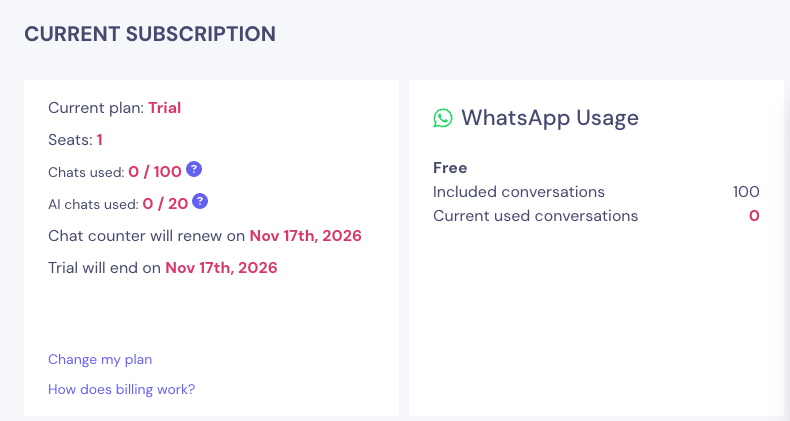
To see how many days are left, look at the banner at the top of the app, or go to Subscription > Subscription in the sidebar. The Subscription page shows Current plan: Trial, the date in Trial will end on, and how many chats and AI chats you've used.
Can I try WhatsApp during the trial?
Yes. During the trial, you can connect a WhatsApp number to Landbot, and the WhatsApp channel works for the 14 days of the trial. When the trial ends, the channel stops working.
To connect a number, see Adding a WhatsApp number to your account. To remove one, see WhatsApp Number Deletion.
Can I extend my trial?
Yes, on request. Email help@landbot.io and explain why you need more time: the team reviews every request.
What happens when the trial ends?
When the trial ends, your account moves to the free Sandbox plan. Your agents and data stay saved.
● Agents without paid blocks keep working as before.
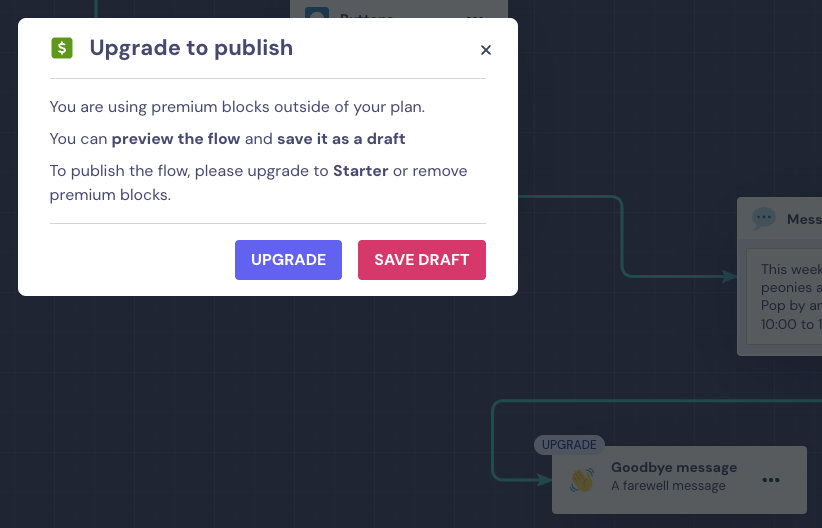
● Agents with blocks from paid plans only work in Preview. To publish them again, remove those blocks or upgrade to a paid plan.
● Paid features, such as hiding the "Made with Landbot" footer, turn off.
When you click Publish on an agent that uses a block from a paid plan, Landbot opens Upgrade to publish and names the plan the block needs, such as Starter or Professional. To publish the agent, upgrade to that plan or remove the block.
What happens to my data when the trial ends?
Landbot keeps all your account data while your account stays active. An account that stays inactive for a long time can be deactivated, as the Retention policy explains.
To delete your account at any time, see Account Settings.
How do I upgrade to a paid plan?
To upgrade, go to Subscription > Plans & Pricing and pick a plan. You can upgrade at any time, during the trial or after it.
The Plans & Pricing page compares the Sandbox, Starter, Professional and Business plans, so you can see which features each one includes.
To get help choosing a plan, book a demo with the Sales team.